
Abel Cobreros

Process automation

Connect your tools. Reduce repetitive work.

I automate repetitive processes and connect your company tools to save time, reduce errors and improve daily operations.

  • Integrate tools and processes
  • Reduce repetitive manual tasks
  • Reduce avoidable data-entry errors
  • Recover time for higher-value work

Diagnosis

The cost of disconnected processes

When a team repeatedly moves data between spreadsheets, email, and a CRM, the process consumes time and introduces avoidable errors.

Most companies do not have a tools problem, but disconnected processes.

sync_problem

Information silos

Disconnected tools leave teams working with outdated or conflicting data.

error

Repetitive manual processes

Copying data between tools, generating reports or sending tasks manually slows the team down and creates avoidable errors.

psychology_alt

Time spent on low-value work

Skilled team members spend hours copying, checking, and reconciling information instead of handling work that needs their judgment.

Practical integrations

Automation for specific operational workflows

Automated workflows adapted to the processes that slow your business down every day.

CRM & Sales

Automatic capture and follow-up

Forms, emails or sales contacts are automatically registered and generate tasks or alerts without manual intervention.

hub Integration between acquisition, CRM and sales team
receipt_long

Automated invoicing and management

Automation of invoices, payment statuses and synchronization between management tools.

Integration between invoicing, payments and ERP
monitoring

Real-time reports and metrics

Centralize data from different tools to get operational visibility without generating reports manually.

Unified metrics without manual intervention
Internal operations

Connected internal processes

Connection between tools and departments to avoid duplicates and repetitive manual tasks. Each action in one system automatically triggers the next ones.

sync_alt Connected flows between tools and teams

FEATURED CASE STUDY

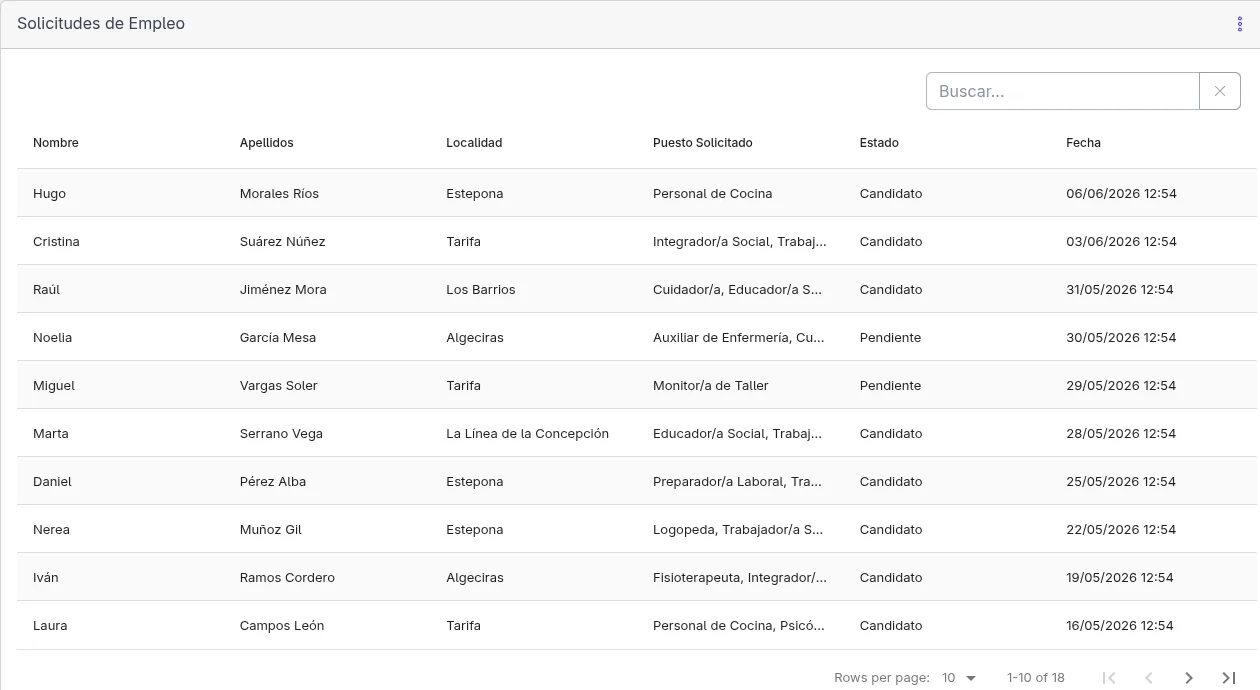
Asansull: a platform that connects people, processes and data

A custom-built solution to centralize recruitment, hiring and staff management, eliminating duplicates and reducing the administrative workload linked to human resources processes.

check_circle

Centralized information and documents

check_circle

Automation of repetitive tasks

check_circle

Faster, more controlled processes

check_circle

Integration with existing systems
View full case study arrow_forward
Absence management screen from the Personas Asansull platform

Results

Automation should have a clear operational case

Before building, I compare the implementation and maintenance cost with the time, errors, and delays the current process creates.

check_circle

Lower manual processing cost

check_circle

Fewer errors and less rework

check_circle

More capacity in existing teams

check_circle

Current information across systems

check_circle

More time for work that needs judgment

check_circle

A measurable basis for assessing return

bolt

Common flows

Automatic lead capture and sales assignment

Incoming lead CRM Sales task Automatic follow-up

Incoming contacts can be recorded, routed, and assigned to the appropriate salesperson, with follow-up tasks created automatically.


Multi-channel inventory synchronization

Order ERP Invoicing Stock Notification

Stock updated automatically between your online store, ERP and warehouse in real time.


Automatic executive reporting

Data sources Consolidation Generated report Management distribution

Key business reports generated and distributed automatically to management with KPIs updated in real time.

Use cases

Types of automations I implement

Every company has different processes, so I design automation around the workflow and systems already in use.

hub

API integration

bolt

Connected processes

receipt_long

Automatic invoicing

contacts

CRM synchronization

monitoring

Automated reporting

sync_alt

Automated processes

inventory_2

Inventory management

mark_email_read

Automatic email marketing

manage_accounts

Automatic customer management

notifications_active

Alerts and notifications

Frequently asked questions

Everything you need to know about automation

Answers to common questions before you make a decision.

Good candidates include repeatable processes that move data between tools, send notifications, generate documents, or update records. Common examples are lead capture, invoicing, reporting, customer onboarding, and inventory synchronization.

No. I work with the tools you already have. The goal is to connect them and make them work together, not replace them.

In most cases yes. Many current tools allow integrations through APIs or standard connections. First I analyze your current system to validate the best way to connect it.

Automation can help small and medium-sized companies when a stable, repetitive process consumes enough time or creates enough errors to justify the investment. Data and document-heavy workflows are often strong candidates.

It depends on complexity. A simple automation may take a few days, while several interconnected processes can require multiple weeks. I review the process and integrations before defining the scope.

Yes, although the amount varies. Automations should be monitored and may need updates when an API, connected tool, data format, or business process changes.

Not sure whether you need custom software or a standard tool?

When it makes sense arrow_forward

Which repetitive process is taking too much time?

I will review your current workflow and identify where automation could reduce manual work, errors, and delays.

Book a free initial consultation