
Comanda / Online ordering for restaurants
Your own restaurant ordering website and kitchen system, with no commissions
Comanda is an online ordering system that runs on your restaurant's own domain, under your own brand. Customers order takeaway from their phone for collection or delivery, the kitchen gets the order on a tablet, and you pay no commission on any order. I install it, set it up and hand it over with your menu already loaded.
- No per-order commission
- On your domain, under your brand
- No app to download
- Your customers and your data stay yours
In a Spanish kitchen, the «comanda» is the order ticket the cooks work from. Hence the name.
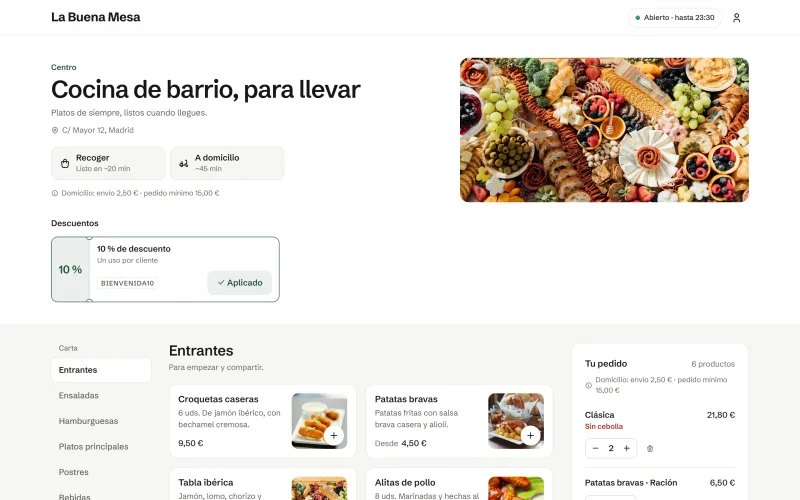
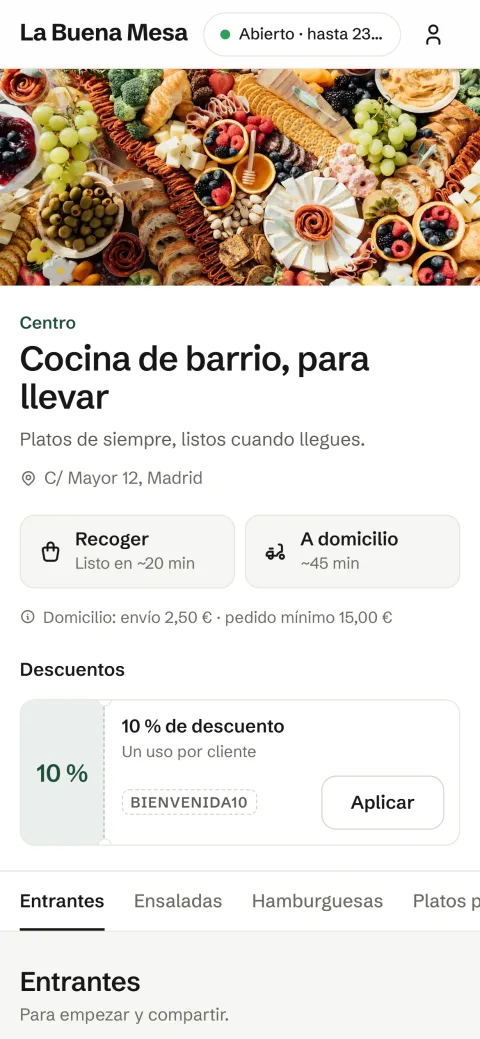
The problem
Delivery platforms bring you orders, but keep your margin and your customer
Every order that comes through a marketplace like Just Eat, Uber Eats or Glovo pays a commission, and the customer who placed it belongs to the platform, not to you. Comanda gives you the same online sales channel, but on your own ground.
On a marketplace With Comanda
Every order pays a commission to the platform
No per-order commission: what you sell is yours
The customer and their data belong to the platform
Customers order on your website and their data stays with you
Your menu sits next to your competitors'
Your menu, your brand and your domain, with nobody beside you
Customers have to download an app
They order from their phone's browser, with nothing to install and no account to create
How it works
From the customer's phone to your kitchen, in three steps
No middlemen and no phone ringing at the busiest hour: the order reaches the kitchen in order, and the customer always knows where it is.
The customer orders
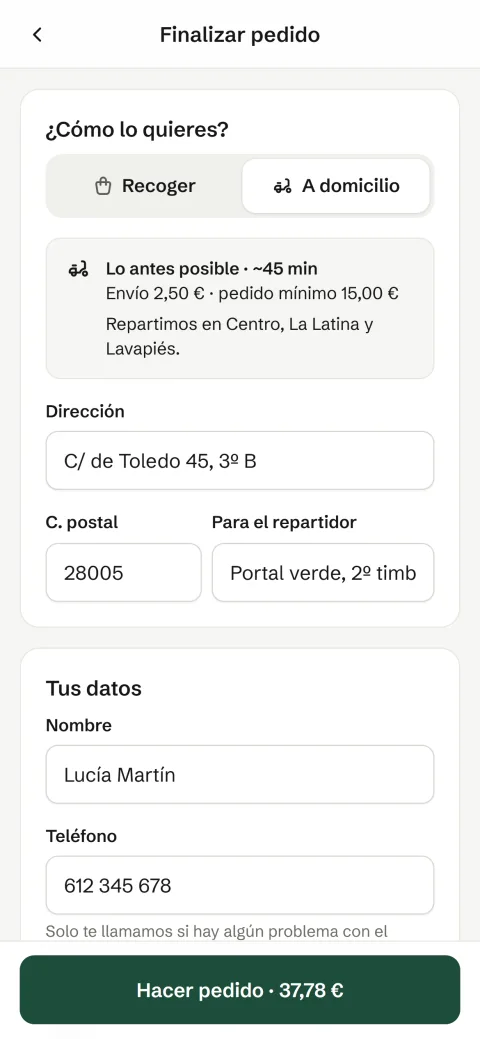
They open your link, pick dishes from the menu, choose collection or delivery and pay when they get it, in cash or by card.
The kitchen gets it
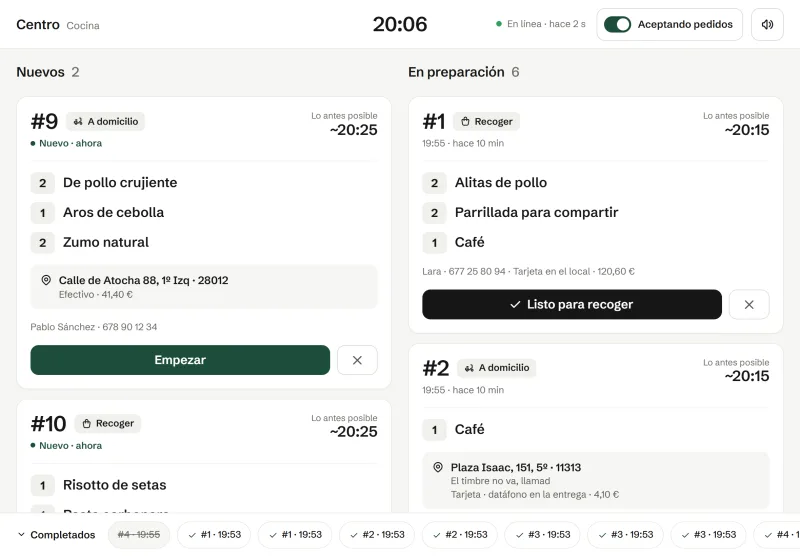
The order appears on the kitchen tablet with a chime. One tap to start cooking, another to mark it ready or out for delivery.
The customer is kept informed
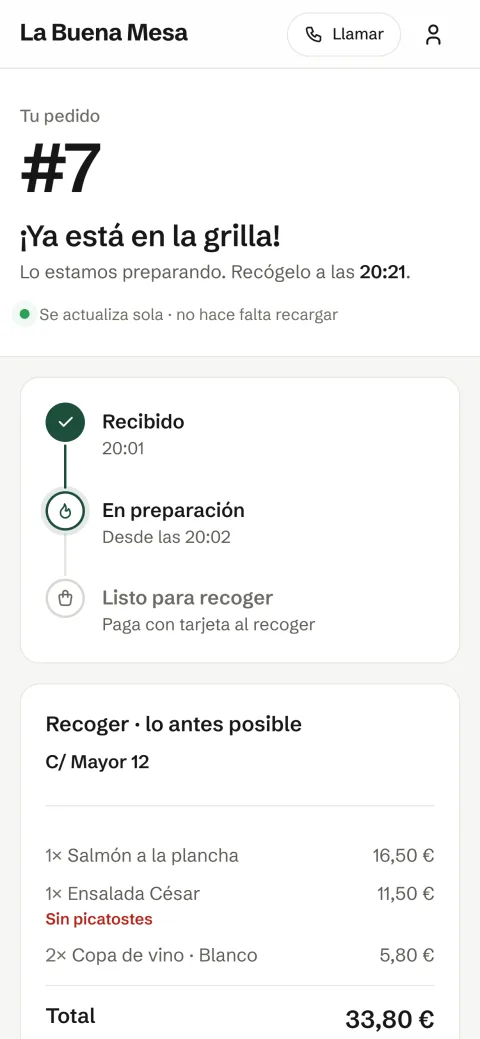
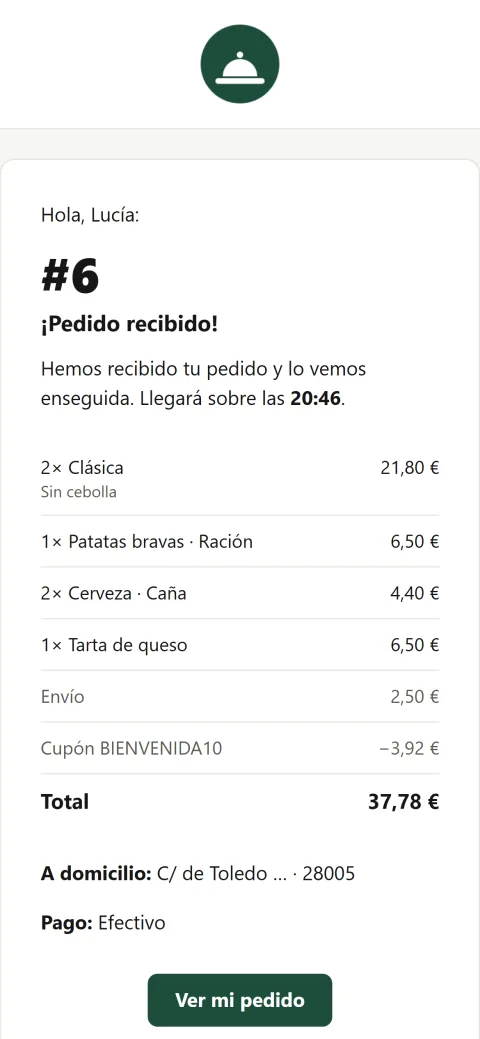
A status page updates itself at every step, and the customer also gets an email when the order is received, being prepared, and ready or on its way.
What's inside
Everything a restaurant or takeaway needs to sell online
Three parts that work together: the website where your customers order, the kitchen board and the panel you run everything from.
The screenshots come from a demo restaurant set up in Spanish. Comanda runs in English too.
For your customers
They order in two minutes from their phone, without signing up
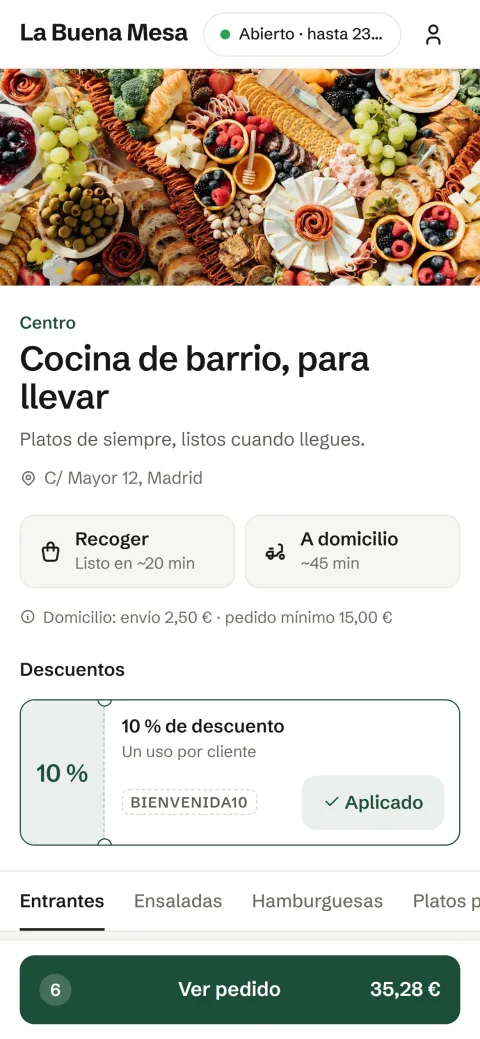
A clear, thumb-friendly menu that makes ordering straight from your website the easy choice.
- A menu with photos, organised by category, with a category bar that stays in view while scrolling
- Sizes (half or full portion, small or large) and ingredients they can remove
- Collection or delivery, as soon as possible or at a chosen time
- Cash or card on collection or delivery, and cash customers can say what they'll pay with so the rider brings change
- Discount coupons and notes for the kitchen, such as allergies or how the meat is cooked
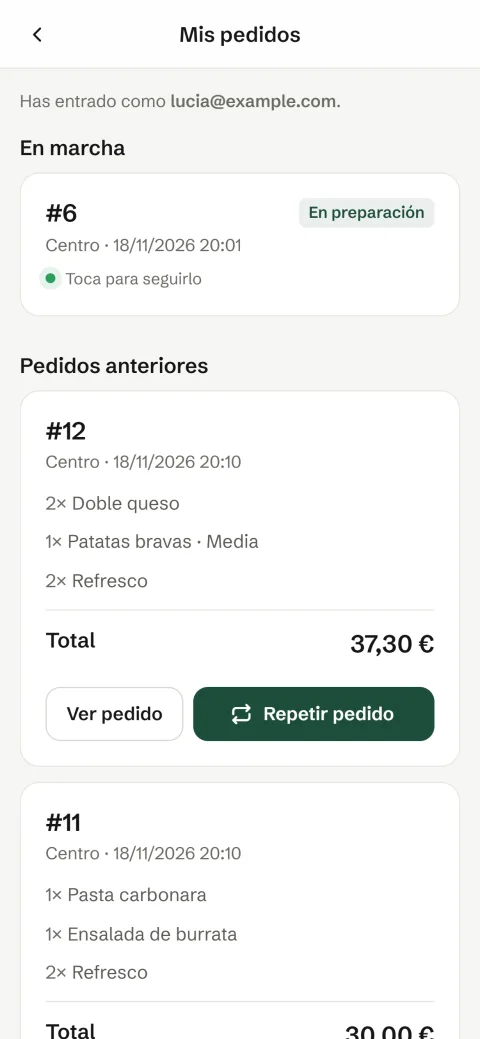
- "My orders": they sign in with a 6-digit code sent by email, no password, and reorder with one tap
- If you have several locations, they choose theirs and see which ones are open
For the kitchen
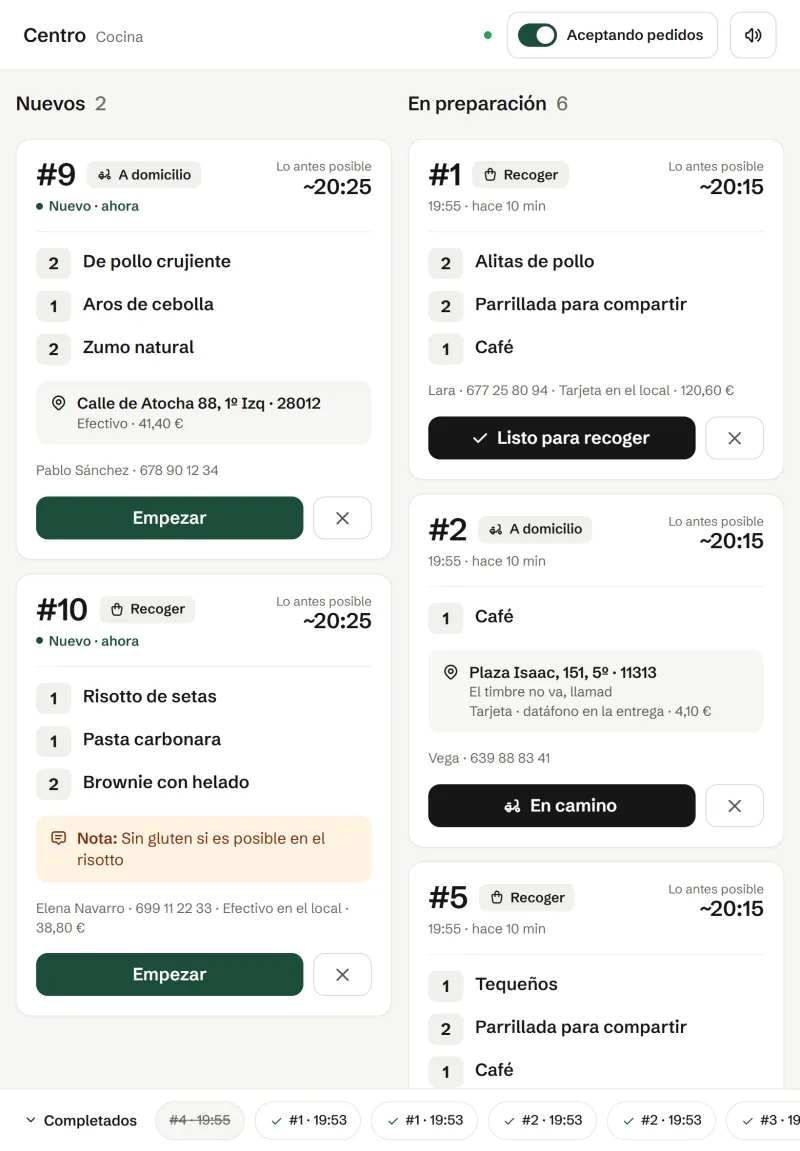
A tablet on the pass with every order in view
Big tickets you can read at a glance, with what matters highlighted, so nobody has to guess.
- "New" and "In preparation" columns that update themselves, with a chime for every new order
- The screen stays awake while the board is open
- Removed ingredients in red, customer notes highlighted, delivery address, payment method and due time
- Tickets turn amber when they're nearly due
- One tap to start, mark ready or out for delivery, or cancel with a reason
- Pause online orders when the kitchen is overwhelmed, and mark a dish as sold out
For you
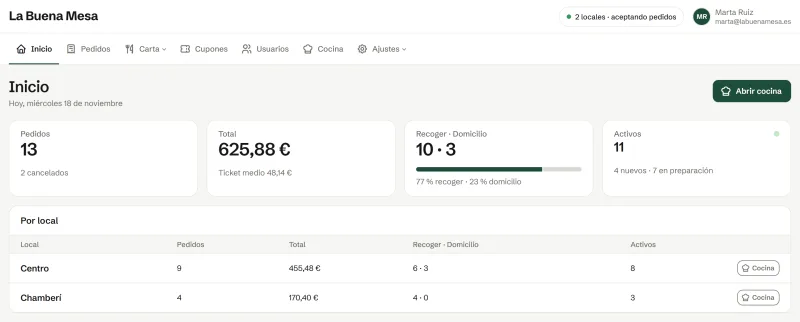
A panel to see how the day is going and change whatever you need
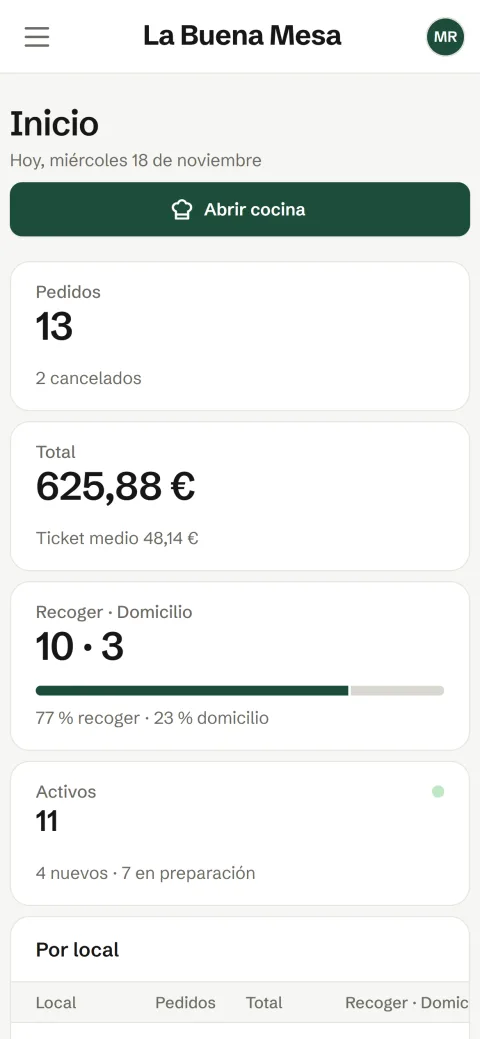
From your laptop or your phone, without waiting on anyone to add a dish or change your hours.
- Today at a glance: orders, revenue, average ticket, the collection and delivery split, and active orders per location
- Order history with filters, search, CSV export and a detail view for each order
- Menu: categories and dishes you reorder by dragging, photos, sizes, ingredients, visible or hidden, and "available today"
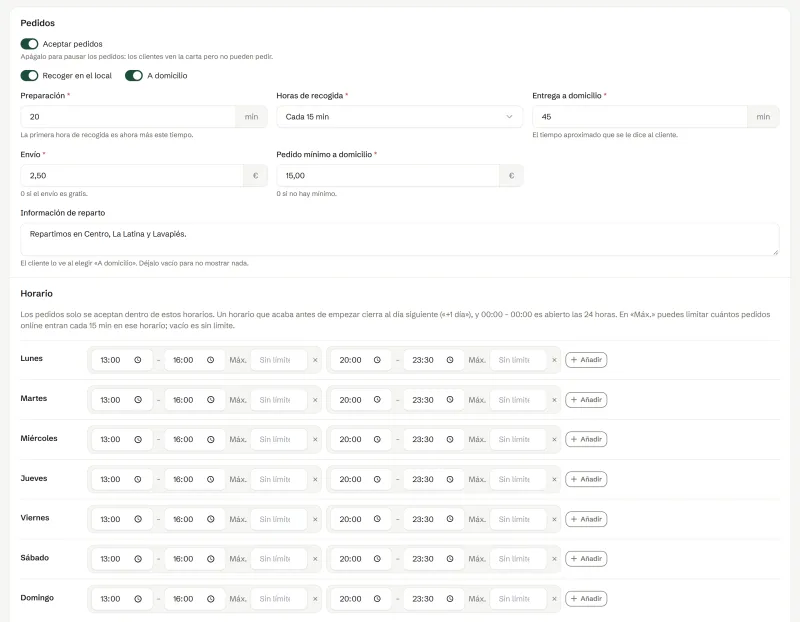
- Locations: opening hours per day with several time windows, preparation time, collection and delivery, fee, minimum order and delivery area
- A shareable ordering link for each location, ready to turn into a QR code
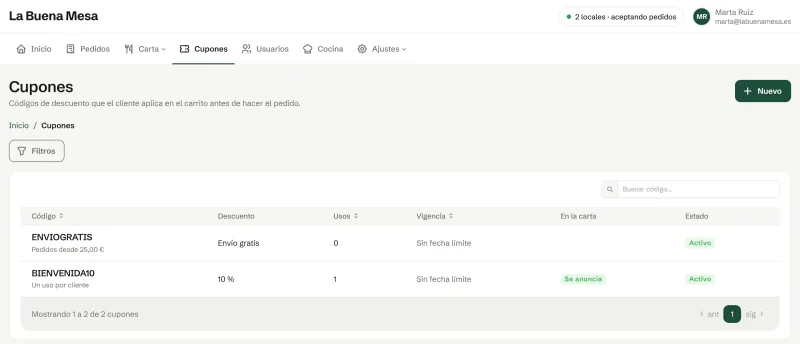
- Coupons, staff accounts (you, plus a shared login for each kitchen tablet), restaurant details and editable legal pages
The details
What makes the difference on a Friday night
The small things that save phone calls, mistakes in the kitchen and customers who never come back.
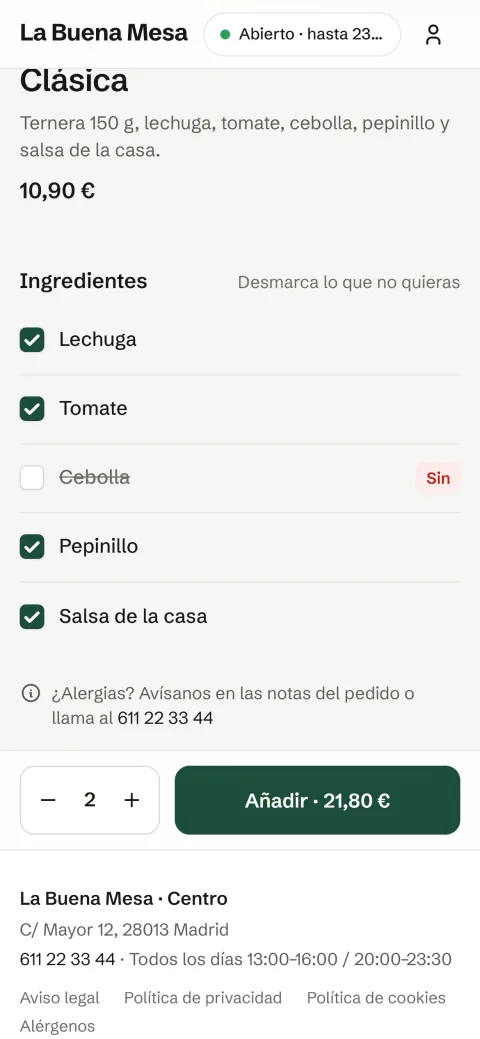
"No onion", from dish to ticket
The customer unticks what they don't want, and the same note appears in red on the cart, the order status page and the kitchen ticket. Nobody has to remember it.
Opening hours and delivery your way
Several time windows a day, an optional cap on orders per slot so the kitchen doesn't get swamped, plus preparation time, delivery fee, minimum order and delivery area for each location.
Coupons applied with one tap
Percentage, fixed amount or free delivery, with a minimum order, a per-customer limit, dates and a usage cap. Show them on the menu and customers apply them without typing a code.
Reorder in one tap
Regulars open "My orders" and order their usual again without hunting for each dish.
Pause orders and sell out dishes
If the kitchen can't keep up, online orders are paused from the board itself. If a dish runs out, it's marked as sold out.
Built properly
Built with the same care as custom software
Comanda is a modern Laravel application. You don't need to know what that means: what matters is that it's fast, backed up and watched over.
Fast on a phone
Mobile-first and light, so the menu loads quickly.
Under your brand
Your logo, your colour and your font. To your customers, it's your restaurant's website.
English or Spanish, pounds or euros
Each installation runs in English or Spanish, in the currency you use.
Ready for Gibraltar and Spain
Phone formats, postcodes and starter legal texts: legal notice, privacy, cookies and allergens.
Backups and monitoring
Automatic off-site backups, error tracking and monitoring.
Over 950 automated tests
A test suite that checks ordering, the kitchen board and the admin panel work as they should.
How I work with you
I get it running for you, not hand you a manual
Each restaurant gets its own Comanda installation, with as many locations as it has. I take care of getting it up and running.
Demo and a conversation
I show you Comanda working and you tell me how you operate: locations, collection, delivery and hours.
Your domain and your brand
I install it on your restaurant's domain, with your logo, your colour and your font.
Menu and locations loaded
I load your menu with its photos, sizes and ingredients, and set up each location with its hours and delivery.
Launch and support
I leave the kitchen tablet login ready and stay by your side as the first orders come in.
A setup fee and a monthly fee per location
You pay for the installation once, and it includes adapting the design of your ordering website to your brand. After that, there's a monthly fee for each location. The exact amount depends on how much you want to customise the design and how many locations you have: we talk it through first, then I send you a quote.
A base that grows with you
Comanda is custom software with the foundations already built. If your restaurant needs something it doesn't do today, such as online payment, a connection to the software you already use, or a feature that fits the way you work, I build it for you with its own quote.
Frequently asked questions
Frequently asked questions about Comanda
Answers to common questions before you make a decision.
Not out of the box today. Customers pay on collection or delivery, in cash or by card, and cash customers can say what they'll pay with so the rider brings change. That way you can start taking orders online without signing up for a payment gateway.
If online payment matters for your restaurant, it can be added as custom development, with its own quote.
Yes. Comanda isn't a closed product: it's a custom software base that already handles ordering, the kitchen and day-to-day management. If you need more, such as a connection to the software you already use, a specific report or a different way of handling orders, I build it on top of your installation.
Each extension has its own quote, and we go through it together before any work starts.
There are two parts: a one-off installation fee, which includes designing your ordering website around your brand, and a monthly fee for each location.
The exact amount depends on how much you want to customise the design, how many locations you have and what your restaurant needs. So we talk it through first, then I send you a quote.
No. Comanda works in the browser on a phone, laptop or tablet. Customers don't need to install anything or create an account to order. To see their orders or reorder, they sign in with a 6-digit code sent by email, with no password.
You do. Each restaurant gets its own installation on its own domain. It isn't a marketplace: your customers don't see your competitors and their data isn't shared with anyone. Customers can also delete their own data from "My orders".
Yes, as many as you have. Each one has its own hours, preparation time, collection or delivery, delivery fee, minimum order, ordering link and kitchen tablet. Customers choose a location and see which ones are open, and the dashboard shows active orders for each.
Each installation runs in English or Spanish, in the currency you set (pounds, euros…). It's set up for Gibraltar and Spain: phone formats, postcodes and starter legal texts you can edit.
Comanda is installed on your restaurant's domain and under your brand, so customers feel they're ordering from you. If you don't have a domain yet, we'll look at it on the first call.
Want to see Comanda in action?
I'll walk you through a full demo: the menu on a phone, the kitchen on a tablet and the admin panel. Tell me how you work and I'll show you how it would look for your restaurant and what we'd adapt.
Book a free initial consultation